Calculator - photo vault
- 4.8
- Rating
- 10.00M
- Installs
- Free
- Price

 Analysis by App-foxy
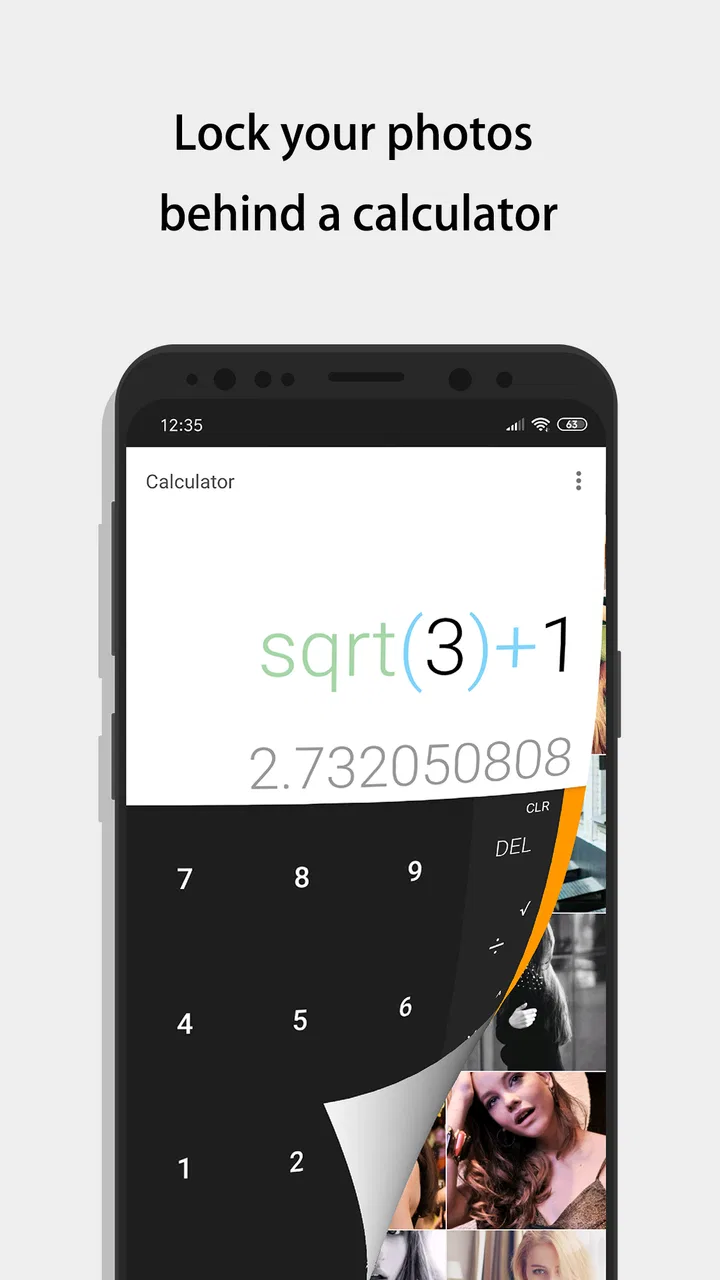
I approached Calculator - photo vault as a privacy tool first and a calculator second. Its public-facing disguise is simple, but the real reason to use it is to keep selected pictures and videos away from the ordinary gallery view. That makes it interesting for anyone who shares a phone, lends it to family members, or simply prefers not to leave personal media mixed with everyday camera files.
The app is made by FishingNet and belongs to the video players and editors category, although that label does not really describe how I used it. In practice, it is closer to a private media locker with a calculator-style entrance. It is free to install, rated for Everyone, and available for devices running Android 6.0 or later. The current version is 11.0.0, and its popularity is easy to understand: it has passed 10 million installs, with a 4.8 average from around 495 thousand ratings.
That strong reception does not mean it is perfect for every privacy situation. A vault app can be useful, but it also creates a new responsibility: you must remember how to access it, keep the protected files organized, and avoid treating it as a replacement for a proper backup. My experience is that the app works best when I use it for a small, deliberate collection rather than as a dumping ground for everything on the phone.
You May Also Like

 Blood Strike: 2.5 Anniversary
Blood Strike’s Loadouts Turn Every Drop Into a Tactical Gamble
A close look at Blood Strike’s custom loadouts: how fast access to signature weapons reshapes its battle royale rhythm, rewards preparation, and narrows the gap between fights.

 Pandora - Music & Podcasts
Pandora’s Music Is Easy to Start, but Harder to Recover
Pandora’s strength is its low-effort path from a seed to a station. Its weak spot is how much confidence it asks you to place in connection, setup, and quiet recovery.

 8 Ball Pool
 Is Built on Rivalries, Rematches, and Routine
A close look at the rivalries, rematches, shared routines, and unanswered safety questions that turn a quick pool match into a persistent mobile community.

 Samsung Music
’s Quiet Strength Is Playing What You Already Own
Its reach comes less from spectacle than from dependable access to a personal library. That simplicity is both the app’s strongest retention engine and its ceiling.

 AccuWeather: Weather Radar
AccuWeather Review: A Quick, Clear Forecast for Everyday Decisions
For everyday plans, the best forecast is the one you can understand quickly. AccuWeather makes rain timing, radar, and local conditions easy to act on, with a few trade-offs.

 Hill Climb Racing
Why Hill Climb Racing Still Turns Crashes Into One More Run
A tiny car, a bumpy hill and one more upgrade: Hill Climb Racing keeps resurfacing because its simple chaos makes every near-miss feel personal.
More From Our News Desk



Where the first-time experience can become confusing
The calculator disguise is the first thing that may make a new user hesitate. Someone expecting a normal calculator may open it and see an ordinary-looking utility, while someone installing it specifically as a vault may wonder how the private area is reached. That is not necessarily a flaw, because the disguise is the central privacy idea, but it does make the opening experience less self-explanatory than a conventional gallery locker.
I found it helpful to decide in advance what I wanted to protect. If I started by selecting a large, untidy collection, the important questions became harder to answer: which files had moved, which ones were still visible in the regular gallery, and whether I had accidentally chosen duplicates? A short first test with a few unimportant pictures is a much better way to understand the movement between the normal gallery and the private space.
Another point that deserves attention is the difference between hiding a file and backing it up. A hidden picture may no longer be obvious in the usual gallery, but that does not automatically make it safe from phone loss, a damaged device, or an ill-considered reset. I would never use this app as the only place for irreplaceable family photos, work evidence, or videos that cannot be recreated.
The same caution applies when changing phones. A vault can make media less visible without making migration effortless. Before deleting the original files or wiping an old device, I would first confirm that the private items can be recovered in a way I understand. This is one of the most important practical distinctions between a privacy layer and a backup service.
There is also a social usability issue. A disguised vault is useful only if the owner remembers the access method and can recognize the protected files later. If several people depend on the same phone, or if you regularly forget passwords and codes, the discreet design may become more frustrating than helpful. I would choose a straightforward private-gallery app instead when transparency and easy recovery matter more than concealment.
What I check before moving anything important
My first setup check is storage space. Moving media inside a vault may involve processing files, and videos in particular can be large. If the phone is nearly full, I would clear some space before importing a large group. A failed or interrupted operation is much easier to diagnose when the device is not already struggling with storage.
Next, I inspect the original gallery carefully. I want to know whether the selected pictures are local files, downloaded items, or media that an ordinary gallery is displaying from another source. This matters because a privacy tool can only handle what is actually available to it. If a picture is merely visible through another service or cloud view, it should not be assumed to be a normal local file ready for secure movement.
I also recommend testing one picture and one short video separately. Pictures and videos do not always behave identically during import, especially when file sizes and formats differ. A small test tells me whether the result is what I expect before I commit a whole album. It also gives me a chance to check the regular gallery afterward and confirm that I understand what “hidden” means on my particular phone.
When the app asks for access to media, I read the system prompt instead of tapping through automatically. The wording and available choices can vary by Android version. If I grant too little access, the vault may appear empty or fail to show the files I want. If I grant access broadly without thinking, I may give the app more visibility than I intended. The sensible choice is the smallest access that still allows the planned task to work.
A further check is the phone’s own battery and background-management behavior. Some Android devices restrict apps that are not used often, and a privacy vault is exactly the kind of app a person may open only occasionally. If the app seems to close unexpectedly or does not finish a media task, I first check whether the phone is aggressively limiting background activity. I do not treat every interruption as evidence that the vault has lost the files.
Before relying on the vault daily, I establish a simple personal routine. I keep the protected collection limited, review it occasionally, and avoid deleting originals until I have verified the result. That routine is more valuable than importing hundreds of files immediately, because it reduces confusion and makes recovery practical if something goes wrong.
A safer workflow for importing and recovering media
My preferred workflow begins with a small batch. I select only the files I genuinely want private, move them, and then inspect both places: the vault and the ordinary gallery. I look for the correct thumbnails, open a picture, play the video, and confirm that the visible copy behaves as expected. This takes a little longer than selecting everything, but it prevents a vague privacy setup from turning into a difficult sorting job.
For videos, I am especially careful about playback after import. A thumbnail alone is not enough. I open the file and let it play for a while, because a video that appears in a list is not necessarily a video I have successfully tested. If a long recording matters, I would check it before removing any other copy or clearing storage.
Organization is another overlooked part of the experience. A vault becomes difficult to use when it contains screenshots, personal pictures, downloaded clips, and work files with no clear structure. I would create a small naming or grouping habit outside the app before importing. For example, I might handle travel documents separately from personal videos, then check each group after it arrives. The exact labels are less important than being able to find something later.
If a file appears to have disappeared, I do not immediately repeat the import. I first check the vault itself, the ordinary gallery, the file manager, and any recently deleted area that the phone may provide. I also look for duplicate copies in messaging or download folders. Repeating the operation without checking can create confusion and may leave several versions in different locations.
When a protected item needs to be used elsewhere, I treat the process as a deliberate temporary release. I recover or share only what I need, then verify whether the resulting copy remains in a public folder or appears in a messaging app’s media history. This is a practical privacy lesson: once a picture leaves the vault, the destination app may create its own copy that the vault cannot control.
I would also avoid testing recovery for the first time during an emergency. If I need an old video quickly, that is the worst moment to discover that I do not remember the access step or that the file was stored on a different device. A calm test with nonessential media gives me confidence without risking anything valuable.
The app includes in-app purchases ranging from $0.99 to $14.99 per item. I would therefore inspect any purchase screen carefully before confirming, especially if I am trying to understand which functions are available without payment. The free installation makes it easy to evaluate the basic experience first, and I prefer doing that before paying for anything connected to a privacy workflow.
When the problem is really the phone, the gallery, or the file
A missing thumbnail can come from the phone’s media index rather than from the vault. Android galleries do not always refresh instantly after files move. If the ordinary gallery still shows an old preview, or if it takes time to remove an item, I give the device a moment and reopen the gallery before assuming the operation failed.
Cloud synchronization can create a second source of confusion. A picture may disappear locally but remain visible in a cloud-backed gallery, or the reverse may happen after synchronization catches up. I check which copy I am viewing before judging the vault. The app can hide a local item, but it cannot make every remote copy vanish from every service connected to the phone.
File compatibility is another sensible suspect. If one unusual video refuses to play while ordinary clips work, I would compare the problem file with a short, familiar recording. That comparison helps separate an app issue from a format or file-integrity issue. I would not conclude that the whole vault is unreliable based on one damaged or unusual file.
Phone storage and system cleanup tools can also interfere with expectations. A storage manager may identify private media as unused, or a user may delete a folder while trying to free space without realizing what it contains. I keep the vault out of careless cleanup sessions and read folder names before confirming deletion. Privacy software is not a substitute for careful file management.
For general troubleshooting, I use a quiet sequence: reopen the app, check available storage, review media access, test with a harmless file, and restart the phone if the gallery is clearly stale. I avoid repeatedly uninstalling and reinstalling a vault while protected files may still be inside it. That kind of rushed reset can turn a minor display problem into a recovery problem.
These checks also explain when another option is better. If my main requirement is encrypted cloud backup, family sharing, desktop access, or automated synchronization, a dedicated backup or password-management solution is more appropriate. If I want a visible, clearly labeled private album with simple migration, a conventional secure-gallery app may suit me better than a calculator disguise.
Who gets the most value from this vault
I see the strongest use case in an everyday shared-phone situation. Imagine lending a phone to a relative so they can look through holiday pictures. I may want to show the public album without exposing personal screenshots, private videos, or documents saved beside it. Moving only those sensitive items into the vault keeps the normal gallery easier to hand over while preserving quick access for me later.
It can also help people who keep personal and practical media on one device. A freelancer might have client reference pictures mixed with family photos, while a student may keep private recordings beside lecture material. The value is not just secrecy; it is separation. A smaller, intentional private collection can make the ordinary gallery less revealing when someone else is holding the phone.
The app is less suitable for a person who wants a fully managed security system. I would skip it if I need a clear audit trail, multi-device synchronization, guaranteed archival storage, or a professional document-protection workflow. I would also hesitate if I am likely to forget the access method, change phones frequently, or delete files without checking where they are stored.
Its Everyone age rating and free entry point make it approachable, but those details should not be confused with a promise that every situation is risk-free. The important protection still comes from the phone’s lock, sensible media permissions, careful sharing, and a backup plan. A hidden gallery is one layer in a privacy routine, not the entire routine.
My practical verdict after using it
Calculator - photo vault is a focused choice for hiding selected pictures and videos behind an ordinary calculator appearance. I like the discreet concept, the low barrier to trying it, and the fact that it addresses a very specific everyday problem: keeping personal media out of casual gallery browsing. Its 4.8 average and more than 10 million installs suggest that the approach has connected with a large audience, and I can see why.
My recommendation comes with a clear condition: use it deliberately. Start with a harmless test, verify both pictures and videos, understand what happens to the original files, and keep separate backups of anything irreplaceable. When a file seems missing, investigate the gallery, storage, permissions, and cloud copies before taking drastic action.
For someone who wants a discreet private corner on one Android phone, this app is worth trying. For someone seeking secure backup, effortless migration, or a complete privacy platform, I would choose a different category of tool. The best result comes when I treat the vault as a convenient privacy layer rather than as a magic box that solves every problem involving personal media.
FishingNet has kept the idea easy to understand once the initial setup is clear: ordinary-looking calculator on the surface, private media workflow underneath. That simplicity is its main strength and also its main limitation. It avoids the visual attention of a conventional vault, but it asks me to be more disciplined about remembering access, checking imported files, and planning recovery. Used with that discipline, it is a practical free app for keeping selected photos and videos less exposed in daily phone use.
FAQs for Calculator - photo vault
01What is the primary function of Calculator - Photo Vault?
Calculator - Photo Vault is designed to provide a secure and discreet way to hide and protect your photos and videos. The app masquerades as a functional calculator, but it secretly functions as a vault that only you can access with a PIN or password. This ensures your private media remains hidden from prying eyes.
02How secure is the Calculator - Photo Vault app?
The app uses advanced encryption to ensure that your photos and videos are securely stored. It requires a PIN or password for access, adding an extra layer of security. Additionally, the app supports features like break-in alerts and decoy passwords to further protect your private media from unauthorized access.
03Can I recover my data if I forget my PIN or password?
If you forget your PIN or password, recovering your data can be challenging. However, some versions of the app may offer a recovery option via a registered email address or security questions. It's crucial to set up these recovery options during installation to avoid losing access to your hidden files.
04Does the app support cloud backup for my hidden files?
Yes, many versions of the Calculator - Photo Vault app offer cloud backup options, allowing you to securely store your hidden files online. This ensures that your media is not lost if your device is damaged or lost. Check the app settings to enable and configure cloud backup services.
05Are there any limitations on the type or size of files I can hide in the app?
While Calculator - Photo Vault primarily supports photo and video files, some versions may allow you to hide other file types like documents. However, the storage capacity might be limited by your device's available storage. Always check the app's specifications to understand any restrictions on file types or sizes.
Pros
- Hides photos securely in a disguised app.
- User-friendly interface for easy navigation.
- Supports multiple file formats for storage.
- Customizable security features for added protection.
- Cloud backup option ensures data safety.
Cons
- Limited free storage space available.
- Some features locked behind a paywall.
- May require frequent updates for security.
- Potential risk if password is forgotten.
- App size might be large for some devices.

Calculator - photo vault
Gallery